Are you a busy gamer juggling work, family, and your passion for virtual worlds? Understanding your gaming PC's true capabilities through benchmarking is no longer a luxury, it's essential. This comprehensive guide dives deep into the world of gaming PC benchmarks, offering practical, actionable advice for optimizing your rig's performance without breaking the bank. Discover how to identify bottlenecks, fine-tune settings, and make smart upgrade decisions, ensuring every precious gaming minute is smooth, enjoyable, and lag-free. With insights into the latest trends and tools, we help you master your hardware, whether you're into competitive esports, exploring vast open worlds, or enjoying cozy social games with friends. This informational resource helps you stay current without the hype, providing real-world solutions for common performance problems and limited gaming time.
What are the immediate benefits of benchmarking my gaming PC?
Benchmarking offers immediate clarity on your PC's real-world gaming performance, revealing frames per second (FPS), identifying system bottlenecks, and validating recent hardware upgrades or software tweaks. For a busy gamer, this means maximizing your limited playtime by ensuring your rig delivers optimal smoothness and responsiveness without frustrating stutters or crashes. It's about getting the most enjoyment and value from your gaming setup.
How often should an average gamer benchmark their system?
For the average gamer, benchmarking every 3 to 6 months is a good routine, especially if you're not making frequent hardware changes. However, it's highly recommended after any significant system alteration: a new GPU, CPU, RAM upgrade, a major operating system update, or a new graphics driver installation. Benchmarking helps confirm if the changes improved performance or introduced unexpected issues, ensuring your setup is always primed for play.
Which components are most critical to monitor during a gaming PC benchmark?
During a gaming PC benchmark, closely monitor your Graphics Processing Unit (GPU) and Central Processing Unit (CPU) utilization, temperatures, and clock speeds. The GPU is typically the primary driver for gaming performance, so high utilization is good, but excessive temperatures can cause throttling. Likewise, balanced CPU utilization is crucial, as an overworked CPU can bottleneck even a powerful GPU. Keep an eye on RAM usage too, especially in demanding titles.
Can free benchmarking tools provide reliable data for gamers?
Absolutely, many free benchmarking tools provide reliable and actionable data for gamers. Programs like MSI Afterburner (for monitoring), Unigine Heaven, and Unigine Superposition offer excellent synthetic benchmarks that stress your GPU effectively. While dedicated paid tools like 3DMark provide more comprehensive suites and global leaderboards, free options are perfectly adequate for identifying performance baselines, optimizing settings, and diagnosing common issues without any financial investment.
What's the most common performance bottleneck identified through benchmarking?
The most common performance bottleneck identified through benchmarking for many gamers is an underpowered Graphics Processing Unit (GPU). While a CPU, RAM, or even storage can also be limiting factors, the GPU is overwhelmingly responsible for rendering game visuals and achieving high frame rates. Benchmarking quickly highlights if your GPU is constantly at 99-100% utilization while your CPU idles, indicating it's the component holding back your overall gaming performance.
How can benchmarking results inform my in-game settings adjustments?
Benchmarking results are invaluable for fine-tuning in-game settings. By running a benchmark and observing your FPS (average and 1% lows), GPU/CPU utilization, and temperatures, you can systematically adjust graphic options. If your FPS is consistently too low, reduce demanding settings like anti-aliasing or shadow quality. If you have significant headroom, you might increase texture quality or resolution for a more immersive experience. This data-driven approach ensures optimal visuals without sacrificing smoothness.
Is it beneficial to benchmark my PC before buying new games?
Benchmarking your PC before buying new games can be incredibly beneficial, especially for resource-intensive AAA titles or early access games. By understanding your system's current performance baseline with similar demanding games or general benchmarks, you can predict how well a new title might run. This helps manage expectations, decide if an upgrade is necessary, or simply confirm if your rig meets the recommended specs, preventing buyer's remorse and ensuring a smooth launch day experience.
Is your gaming rig truly pulling its weight when you finally get a moment to relax and dive into your favorite virtual world? For many US gamers, particularly those balancing careers, families, and life's demands, gaming time is precious. You want every second to count, free from frustrating stutters or performance bottlenecks. You’re part of the 87% of US gamers who play regularly, often dedicating 10+ hours a week, and you expect your hardware to deliver a seamless, enjoyable experience. This isn't just about raw power; it's about smart performance, especially when budget-friendly options and value for money are top priorities.
This is where understanding **gaming PC benchmark** comes in. It's your secret weapon to diagnose performance issues, confirm upgrades, and ensure your system is truly optimized for today's hottest titles, whether you're building friendships in a cozy game, competing in an esports arena, or exploring new VR frontiers. We'll demystify the process, providing a practical, no-nonsense guide to benchmarking your PC so you can maximize your fun, enhance your skills, and keep up with trends without falling for the hype. Let’s get your rig running smoother, more efficiently, and ready for whatever game calls you next.
What Exactly is Gaming PC Benchmarking and Why Should You Care?
At its core, **gaming PC benchmark** is the process of putting your computer through a series of standardized tests to measure its performance, stability, and efficiency. Think of it like a fitness test for your gaming rig, assessing its strength, speed, and endurance. These tests simulate real-world gaming scenarios or heavily stress individual components like your CPU and GPU, providing objective data on how well your hardware performs under pressure.
For busy gamers, this data is invaluable. It helps you understand if your current setup can handle the latest games, identify potential bottlenecks that are holding back your frame rates, and validate if recent driver updates or hardware tweaks actually improved performance. Instead of guessing why a game feels sluggish, benchmarking gives you concrete numbers, empowering you to make informed decisions about settings adjustments or future upgrades, ensuring your limited gaming time is spent playing, not troubleshooting.
How Do You Prepare Your PC for Accurate Benchmark Results?
Before you run any **gaming PC benchmark** test, proper preparation is key to getting accurate and consistent results. You wouldn't run a race after a heavy meal, right? Your PC needs to be in peak condition too. First, ensure all your drivers—especially your graphics card drivers—are fully up to date. Outdated drivers can significantly skew results and even introduce stability issues. Next, close all unnecessary background applications. This includes web browsers, chat clients like Discord (unless you're benchmarking its impact), streaming software, and any other programs consuming CPU, RAM, or GPU resources. These can interfere with the test, making your results appear lower than they should be.
Finally, reboot your system before starting the benchmark. This clears any lingering processes or memory leaks that might be affecting performance. Ensure your PC's cooling is adequate and consider monitoring temperatures during the benchmark to ensure your components aren't throttling due to overheating. A clean, fresh system provides the most reliable baseline for your performance tests.
Which are the Best Benchmarking Tools for Gaming PCs?
Choosing the right **gaming PC benchmark** tools depends on what you want to measure. There’s a wide array of options, from free monitoring software to comprehensive paid suites. Here’s a breakdown:
- MSI Afterburner: Essential free tool for real-time monitoring of FPS, GPU usage, temperature, and clock speeds while gaming. Can also be used for mild overclocking.
- Unigine Heaven & Superposition: Excellent free synthetic benchmarks that stress your GPU with demanding visuals, providing a score you can compare online. Superposition is newer and more graphically intensive.
- FurMark: A popular free GPU stress test, useful for checking stability and maximum temperatures. Not ideal for comparative scoring, but great for stability.
- 3DMark (Paid, with free demo): The industry standard. Offers various tests like Time Spy (DirectX 12) and Fire Strike (DirectX 11) for comprehensive GPU and CPU performance evaluation. Great for comparing against global leaderboards.
- PCMark (Paid): Focuses on overall system performance for everyday tasks, including web browsing, video conferencing, and productivity. Less gaming-specific but good for general system health.
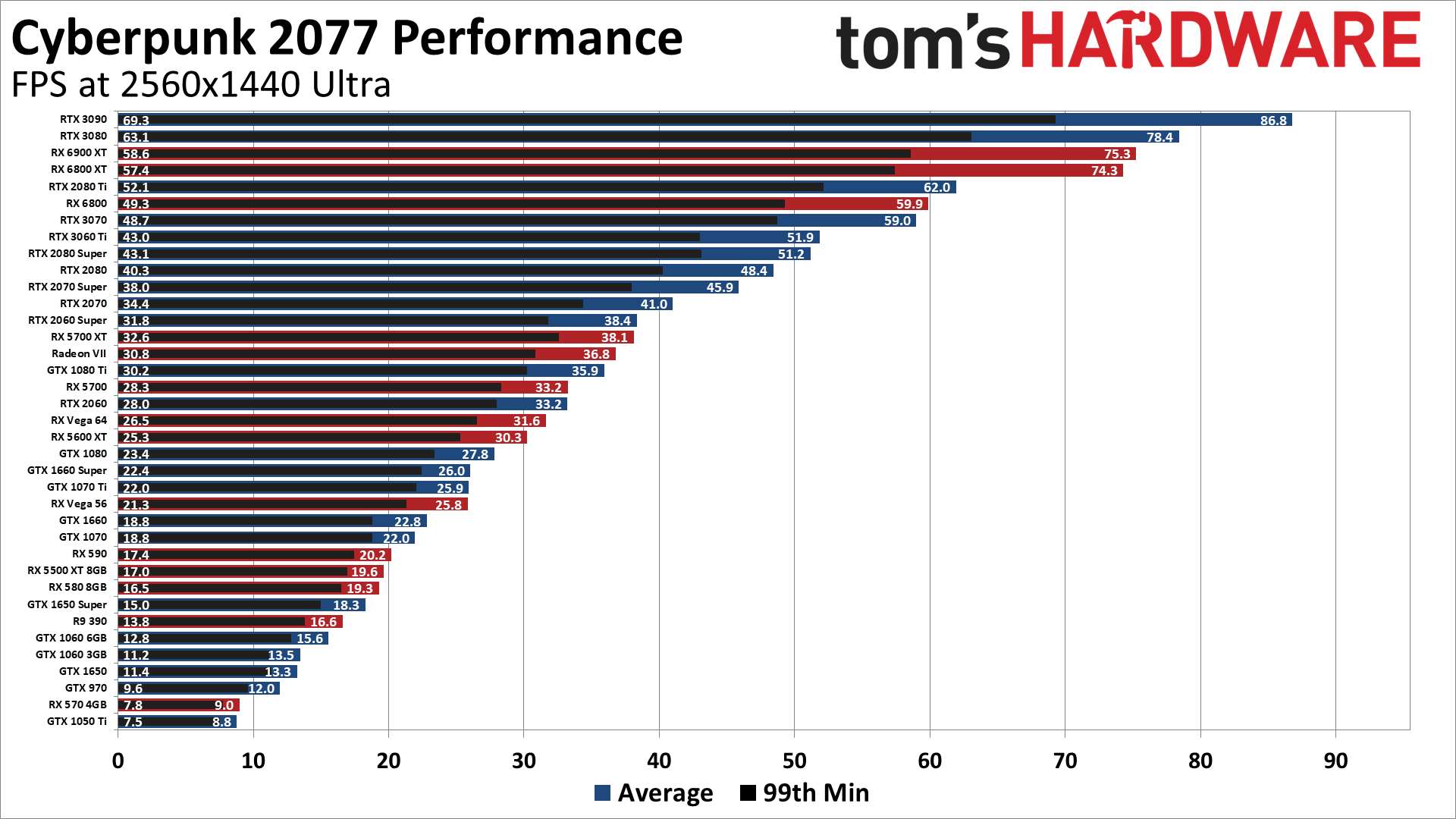
- In-Game Benchmarks: Many modern AAA games like Cyberpunk 2077, Forza Horizon 5, Assassin's Creed Valhalla, and Red Dead Redemption 2 include built-in benchmark modes. These are incredibly valuable as they test your system using actual game assets and engines, providing the most relevant gaming performance data.
For a complete picture, a combination of tools is often best. Start with an in-game benchmark for real-world data, then use a synthetic GPU benchmark like Unigine Superposition, and monitor everything with MSI Afterburner.
What's the Right Way to Run a Gaming PC Benchmark Test?
Running a **gaming PC benchmark** correctly involves consistency and careful observation. Once your PC is prepped and your tools are ready, follow these steps: First, decide on your test settings. For synthetic benchmarks, stick to default or a common preset (e.g., 1080p Extreme, 1440p High). For in-game benchmarks, choose settings you typically play at, or a standardized
Understand Gaming PC Performance Insight, Optimize Game Settings, Identify Hardware Bottlenecks, Plan Smart Budget Upgrades, Compare PC Performance Fairly, Diagnose Performance Issues, Maximize FPS and Stability
35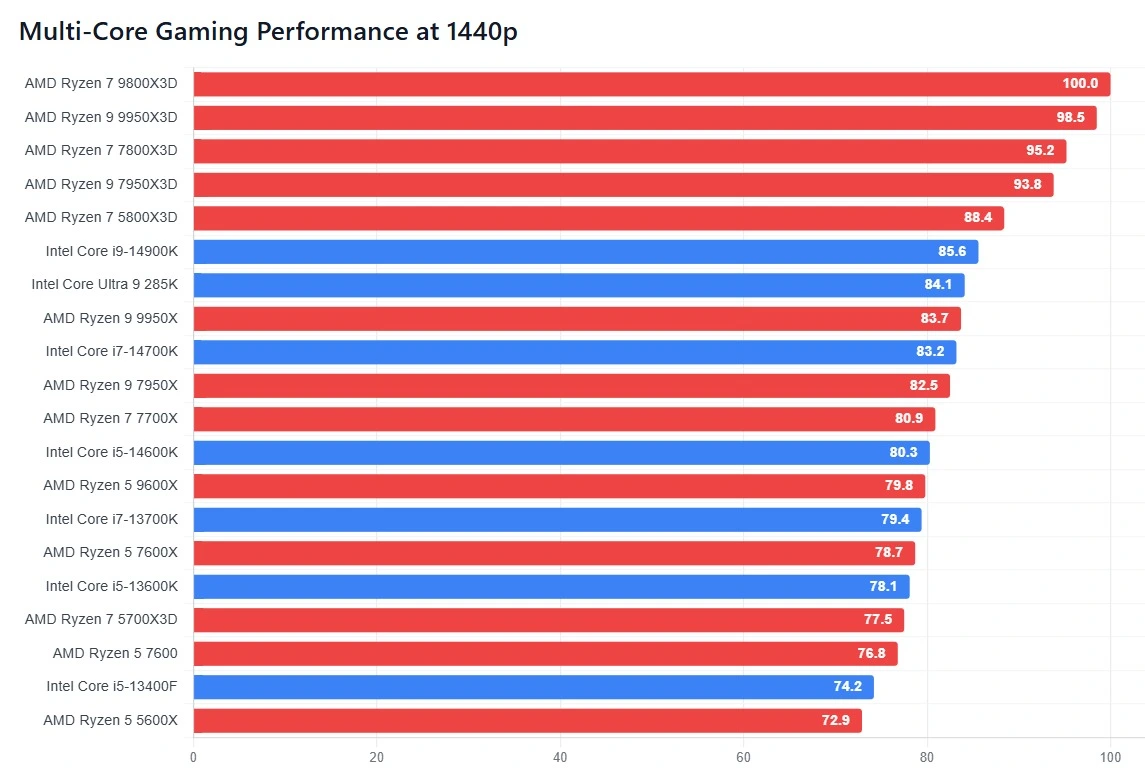
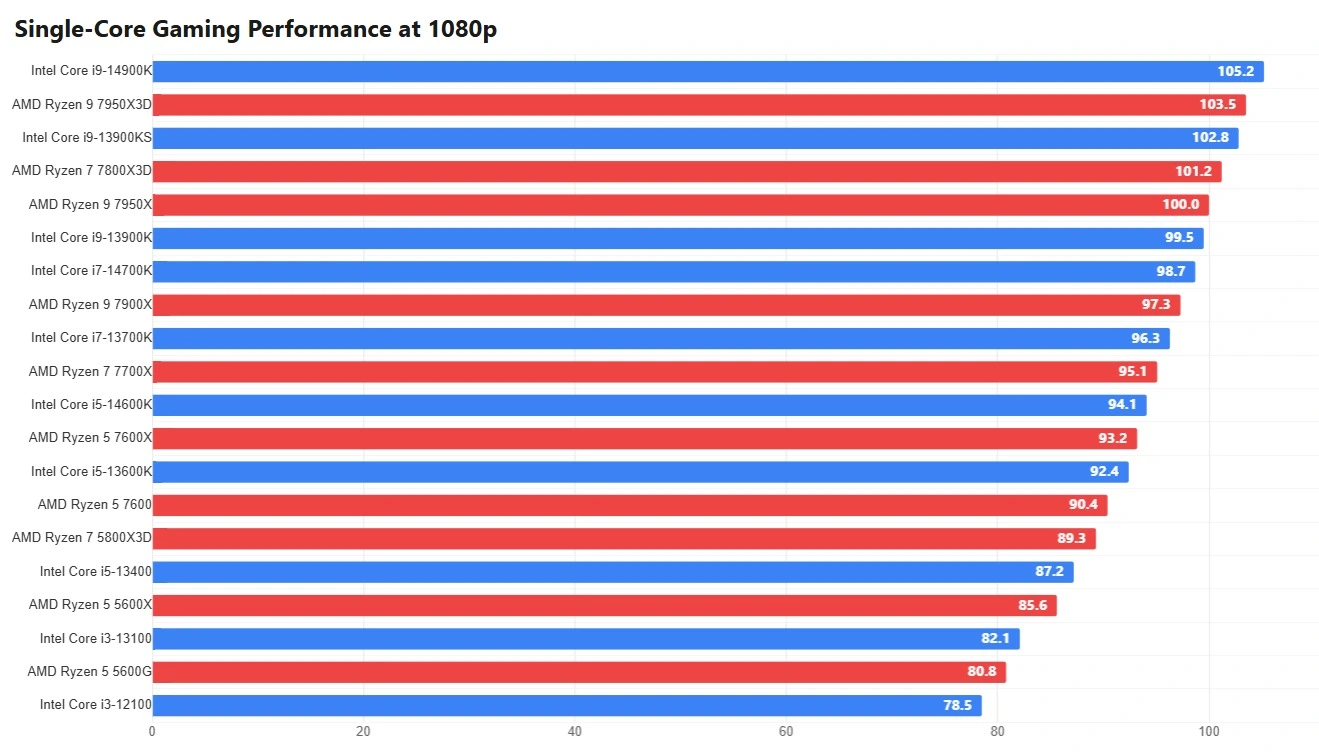
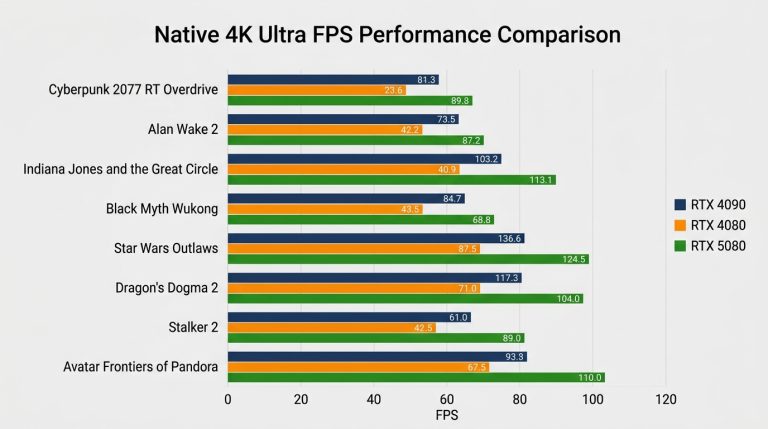
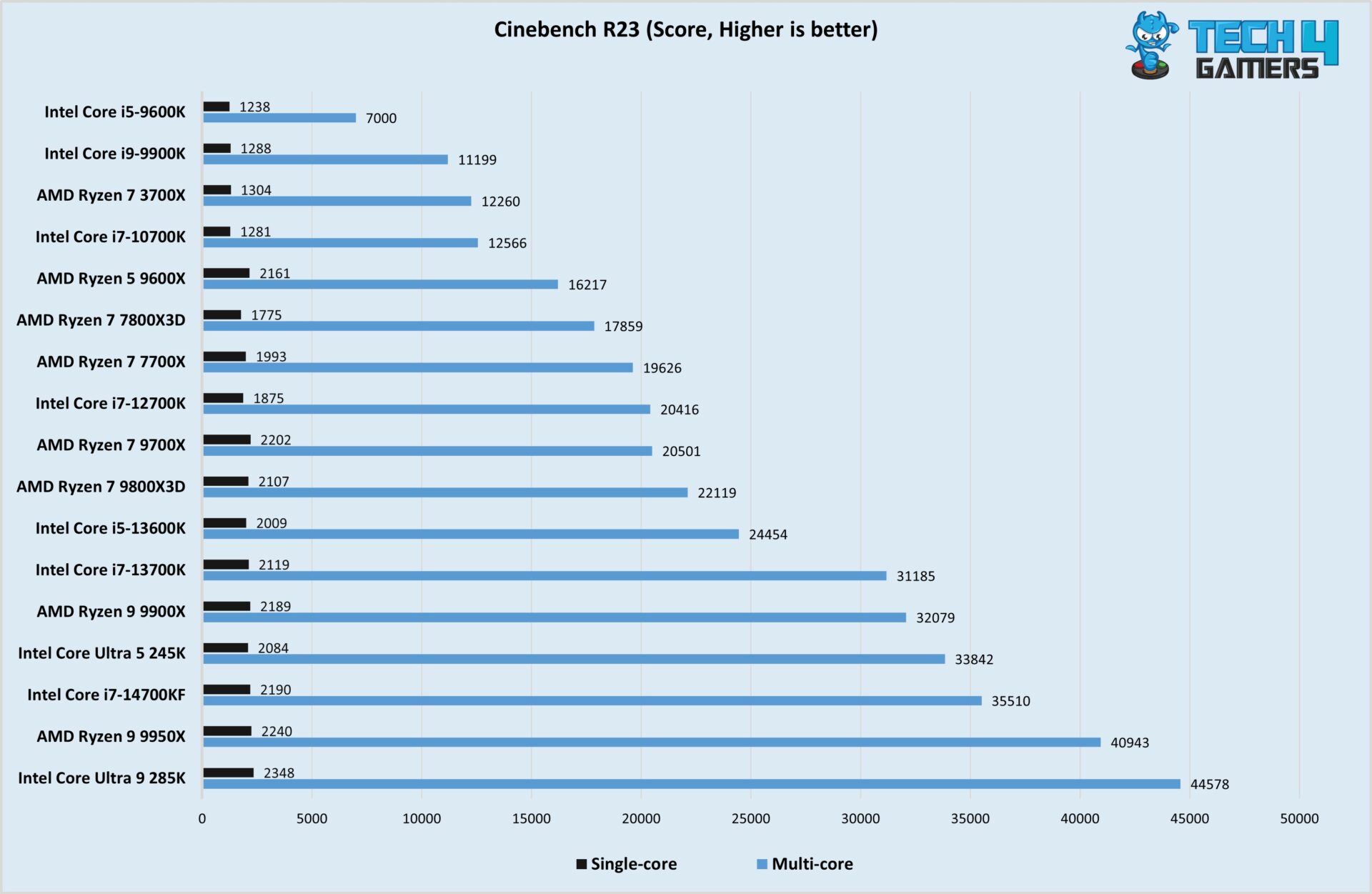
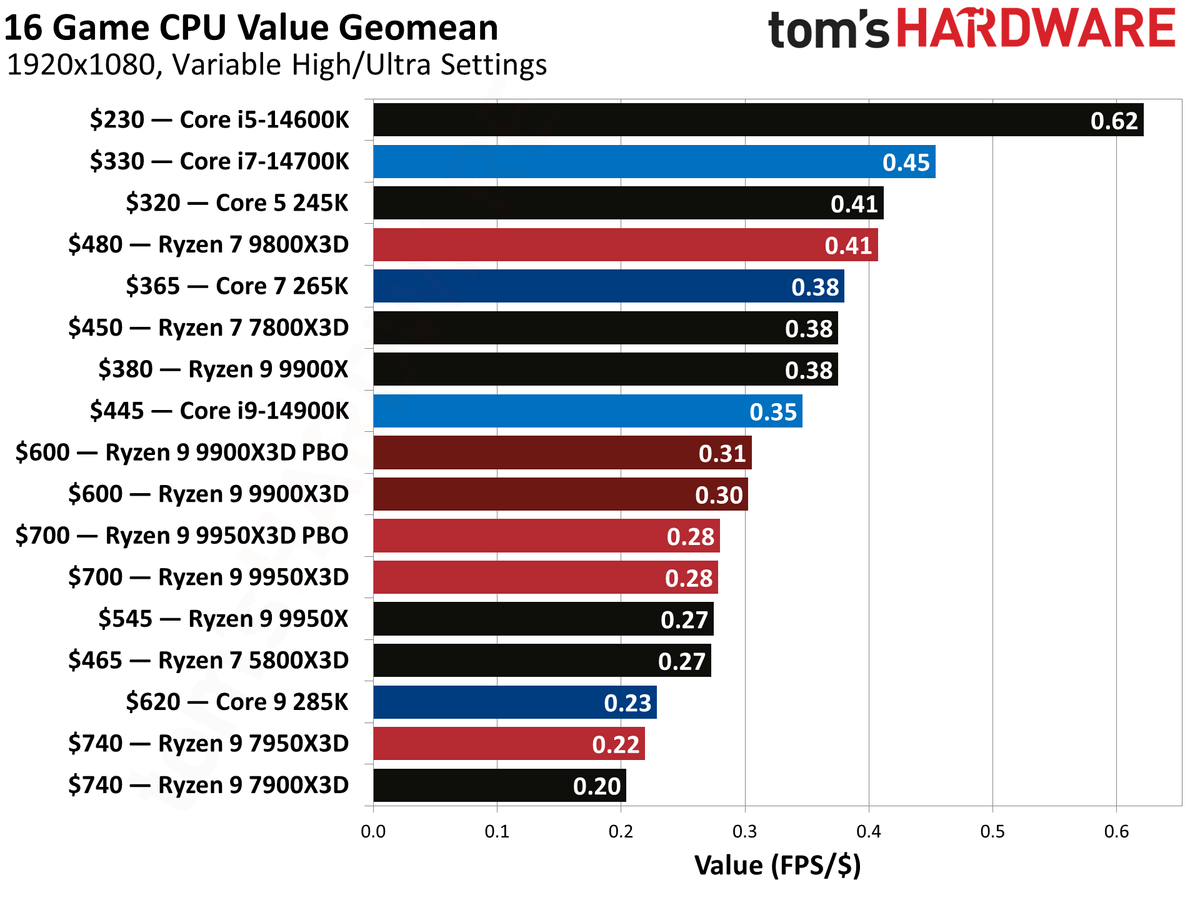
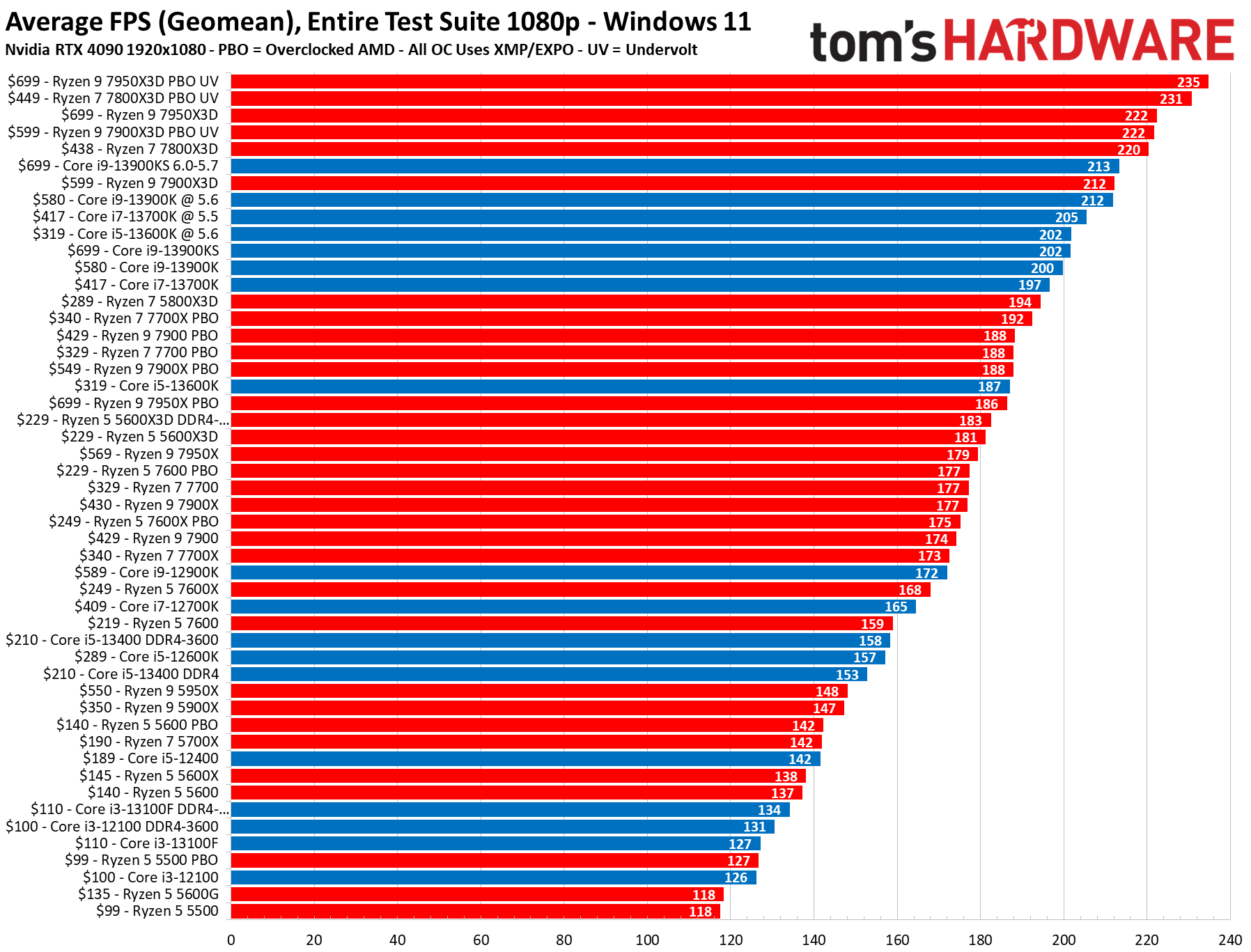
Updated CPU Benchmarks 2026 Ranked CPU Comparison Multi Core Cpu Gaming Benchmarks 1440p.webp. Updated CPU Benchmarks 2026 Ranked CPU Comparison Single Core Cpu Gaming Benchmarks 1080p 1.webp. Most CPU Intensive Games 2026 SunbeamTech Demanding Pc Games Fps Benchmark 4k Ultra 768x429 . Best Budget CPUs In 2026 With Gaming Benchmarks Intel Core Ultra 5 245K Cinebench R23 Test Image By Tech4Gamers 1920x1251 . Grab This Awesome 4K Ready Gaming PC With A 7800X3D And RX 9070 XT For 1200 80
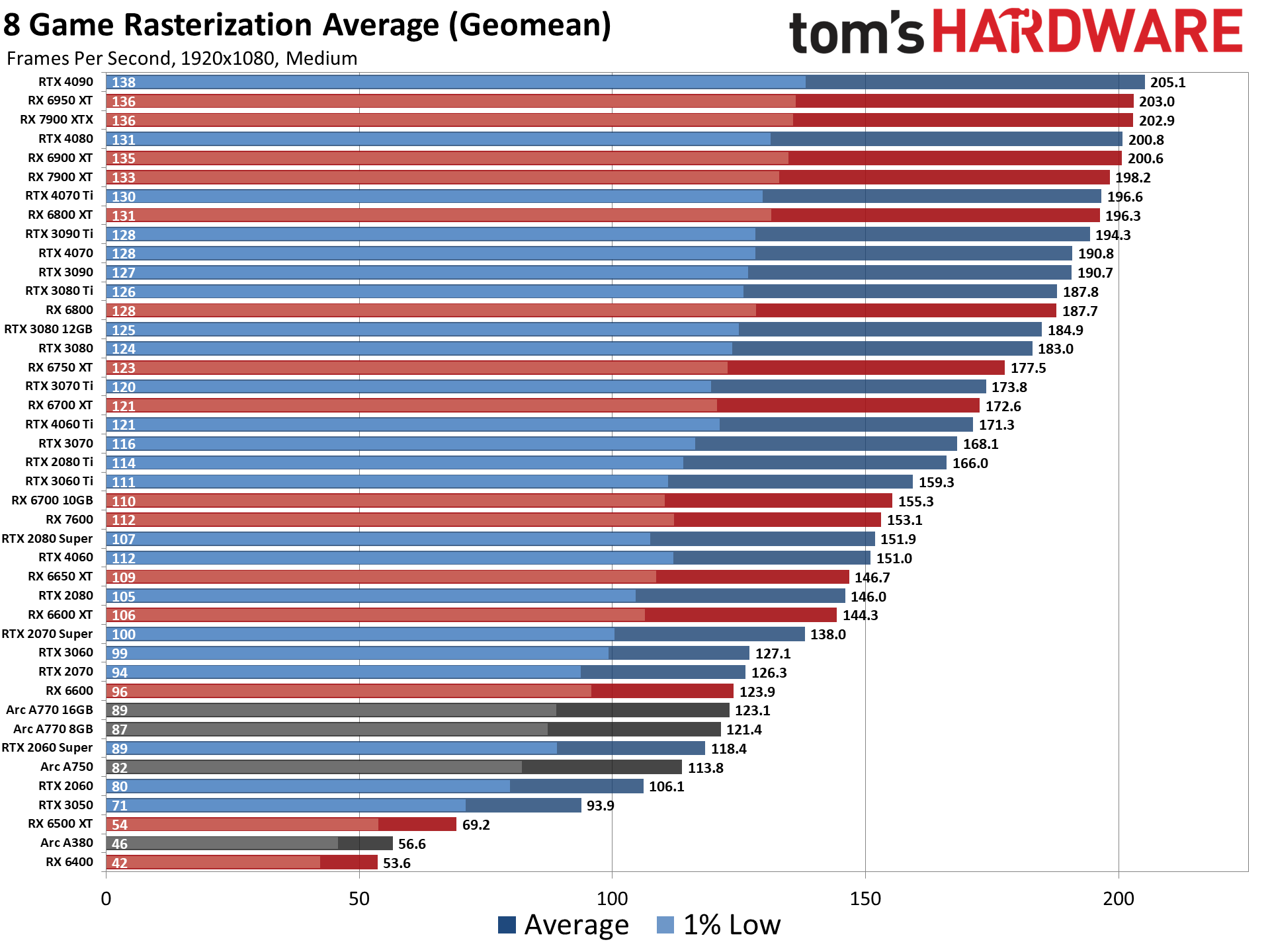

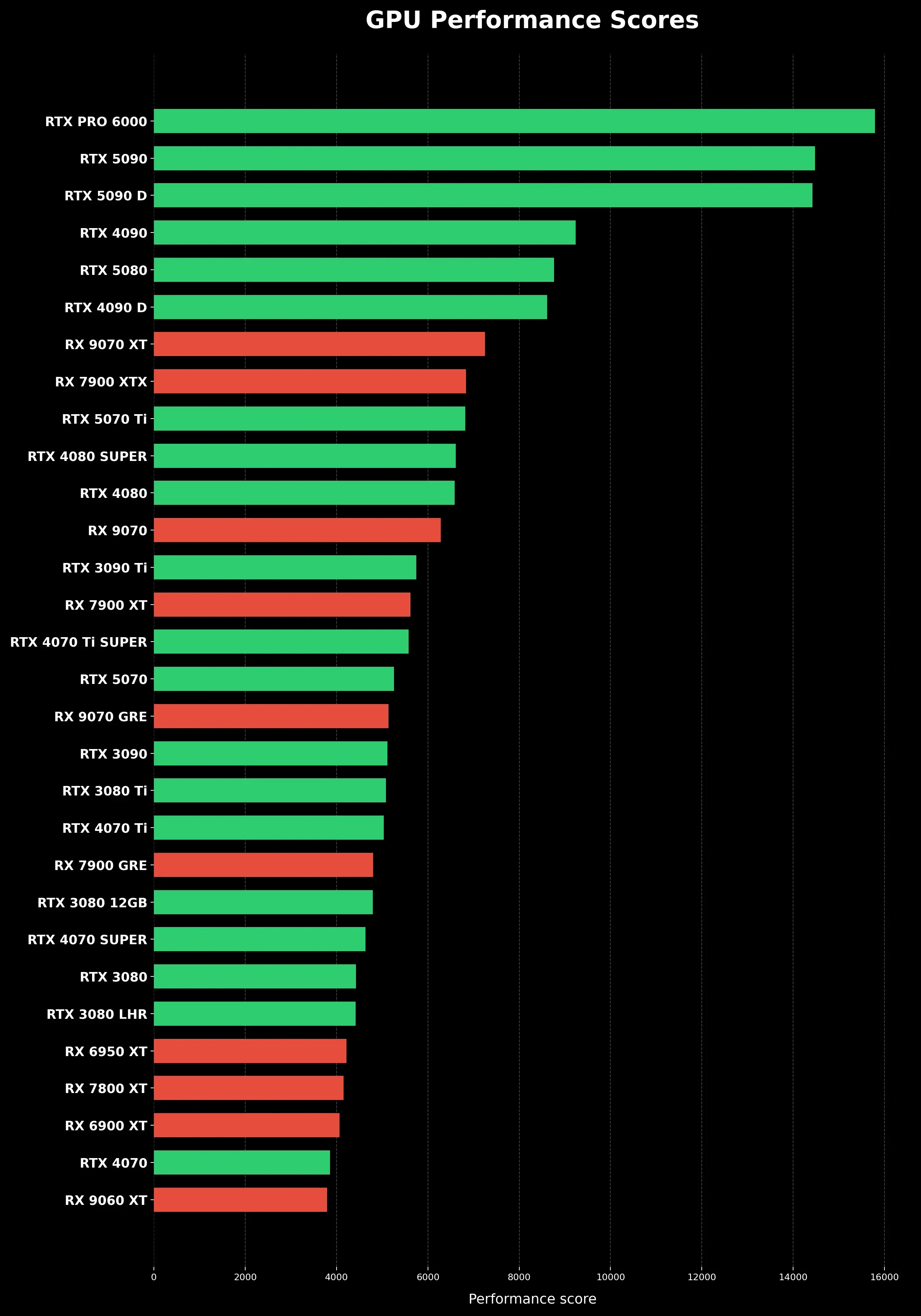
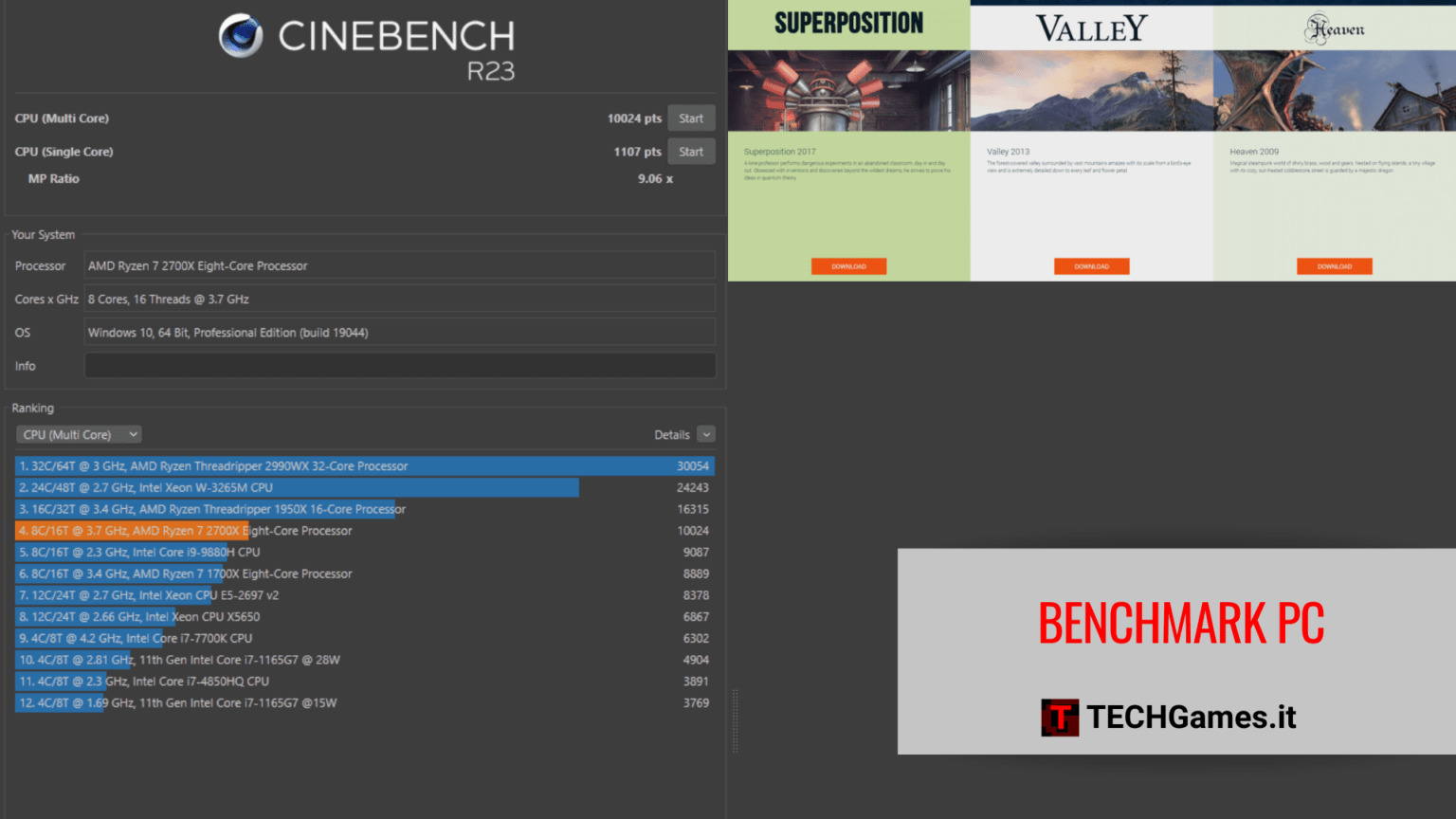
Vital Features Of GPU BENCHMARKS HIERARCHY 2026 . What Does 1000 Actually Get You In The 2026 PC Market 1000 Dollar Gaming Pc Performance Tradeoffs 2026 . Beste Grafikkarte 2026 Vergleich Ranking Und F R PC Gamer Gpu Performance Scores Clean Vertical. Benchmark PC Gaming 2026 Migliori Programmi TECHGames Copertina Benchmark PC TECHGames 1536x864 . AMD S Z2 Extreme Flies Past Intel S Lunar Lake In New Gaming Benchmarks
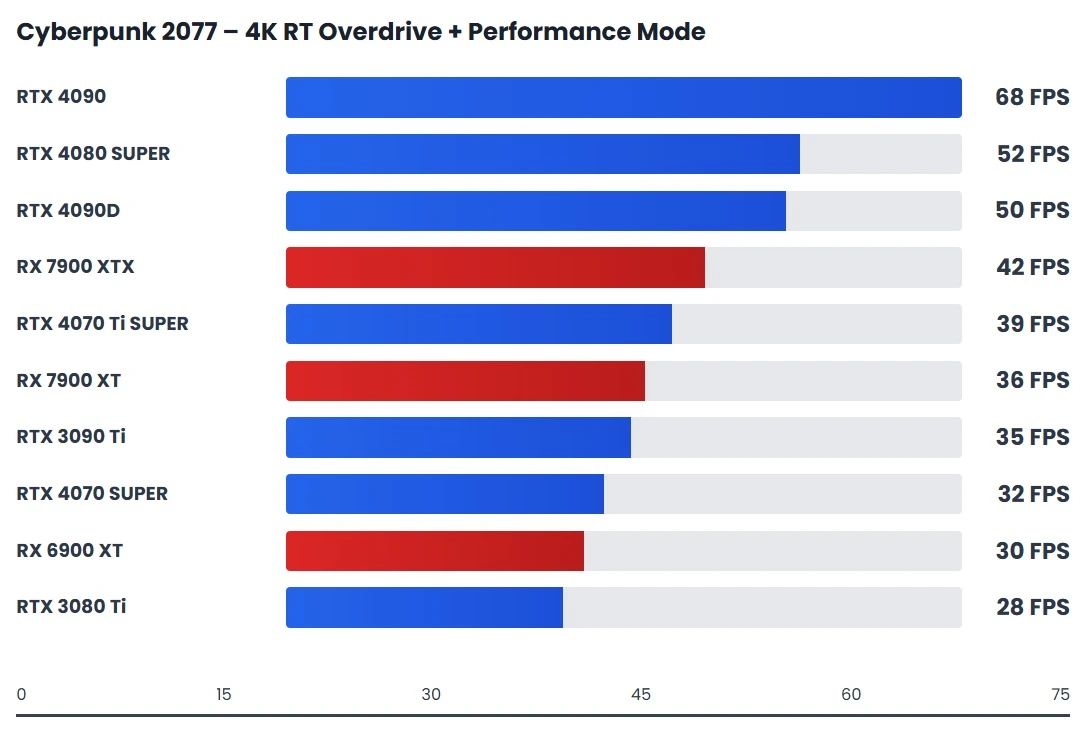


2026 Mobile PC Gaming Benchmarks InvestGame Net 2026 01 27 2026 Mobile Pc Benchmarks Compressed 1 . Updated GPU Benchmarks 2026 Performance Buying Guide Cyberpunk 2077 4k Rt Overdrive Gpu. BEST FREE GPU Benchmark Software For PC TESTED 2026 Best Free Gpu Benchmark Cover 768x432 . Backrooms 2026 Evolve. Best AMD CPUs For Gaming 2025 Sirius Power PC Vlcsnap 2024 11 21 .webp
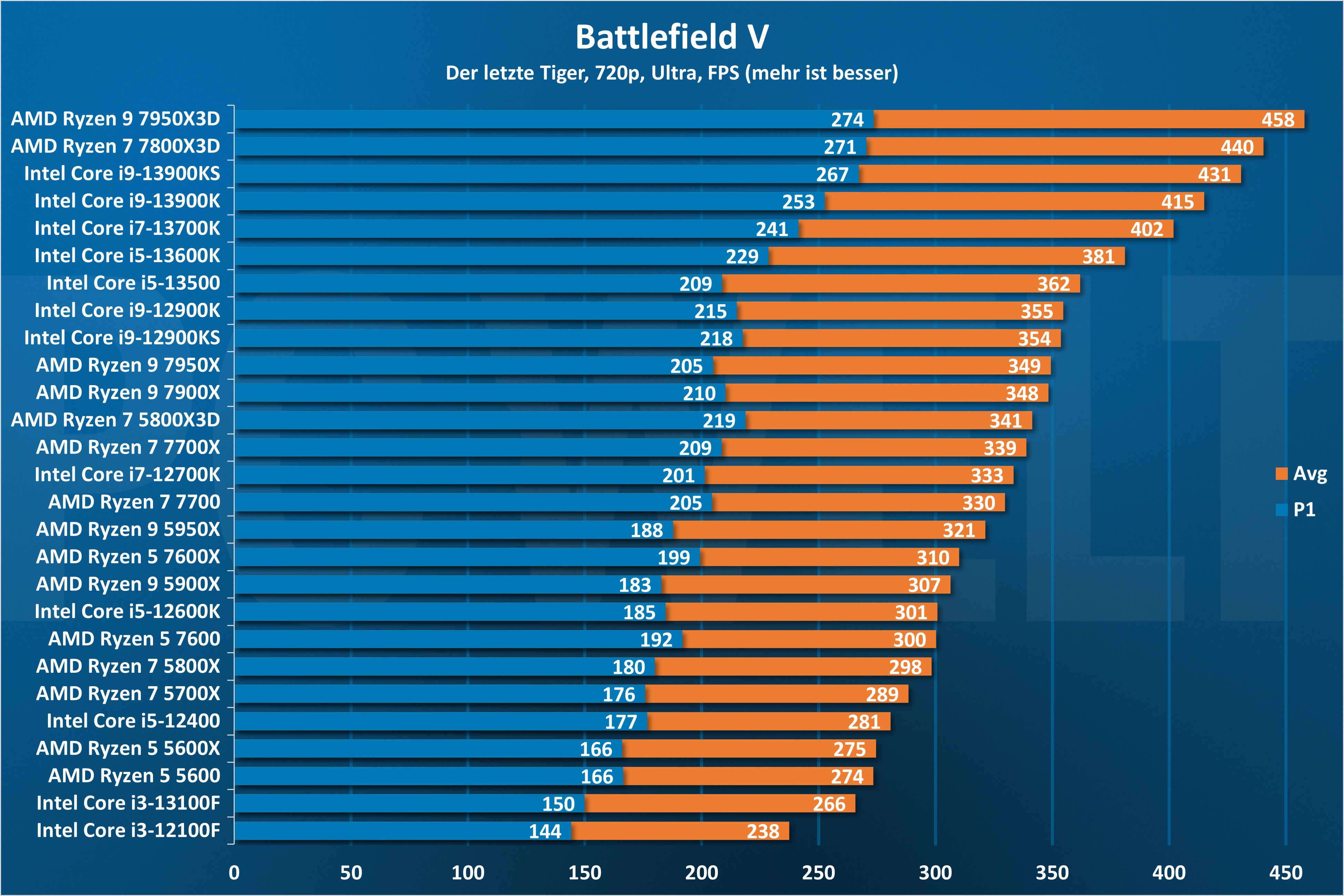


Which Gaming CPUs Have The Best Price To Performance Ratio PCWorld Battlefield V 720p 1 . Best Gaming PC Builds For 2026 Best Gaming PC Builds For 2026.webp. Benchmark Graphic Card 2025 Performance Carte Graphique 2025 IDSQ Starfield 1080p High 4x Foolhardy Remacri .webp. Benchmark PC Gaming 2026 Migliori Programmi TECHGames Benchmark PC Risultati 2 3DMark 280x300 . Updated CPU Benchmarks 2026 Ranked CPU Comparison Best Gaming Monitor For PS5 In 2026.webp
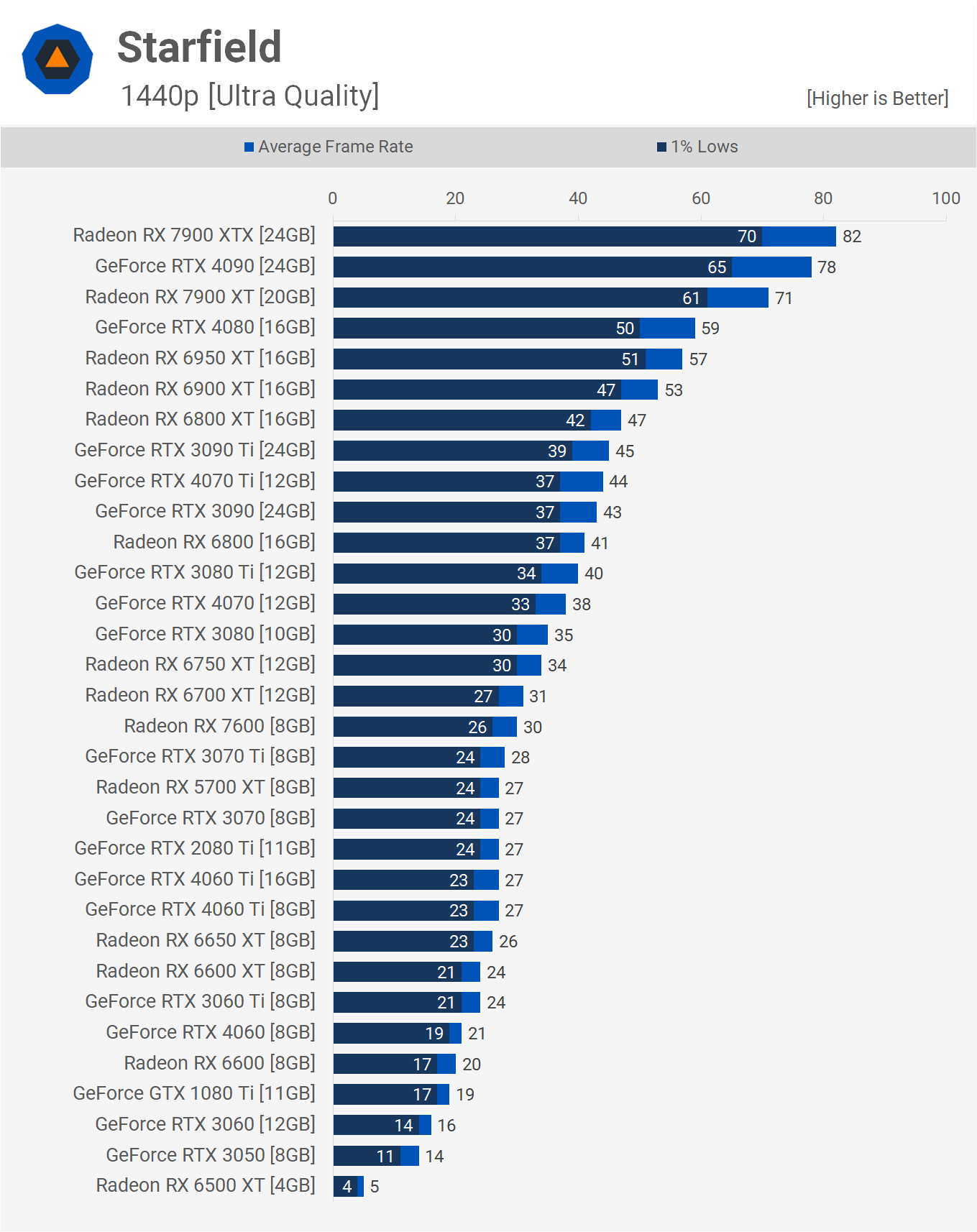


Cyberpunk 2077 Phantom Liberty Benchmark Performance Page 5 Ultra 1440p . Doom Eternal Im Test Gpu Sowie Cpu Benchmarks Und Amd Radeon Rx 9070 Review Doom Eternal Ultra Nightmare 1440p Benchmark Results Graph . Mini PC CPU Benchmark 2026 Cinebench Geekbench Performance Mini PC CPU Benchmark 908d1a1e B966 4d00 B0f0 . Best For Gaming PCs In 2026 Intel AMD Guide Motherboard For Gaming Pcs In 2026.webp. Best Benchmarks For Graphics Cards GPUs June 2026 Guide Best CPU For Gaming PC 1024x559



7 Best Gaming PCs Of 2026 Power Performance And Value Revealed Top Gaming Pcs 2026 1lmv2 . Pc Benchmark Gaming Spiele Benchmarks F R CPUs Und PFLM . Building An Affordable Gaming PC For 2026 GeekaWhat FI DP056 Antec Flux M 9060XT 1024x576 . The Ultimate Gaming PC Build 2026 Guide By Xidax 1 Unnamed . The Ultimate Guide To Building A PC In 2025 Computer Cave Desktop Gaming In 2026 Why Performance Issues Usually Mean Repair--Not Replacement

PC Performance Test And Gaming Benchmarks HardwareDB Benchmark . Mobile PC Gaming Benchmarks 2026 Game Industry Library Page 1 . Top Rated PC Games Of 2026 The Must Plays And Their GPU Image. Test Neuer Benchmark Ihr Testet CPUs Und GPUs In Cinebench 2026 Screenshot 2026 01 01 192827 Jpg.1692420. Gaming PC Buying Guide 2026 Prebuilt Vs Custom Build Gaming Pc Buying Guide 2026