Unlock the power of Roblox modules to streamline your game development. This comprehensive guide demystifies how to use modules roblox effectively, helping creators from hobbyists to seasoned developers organize their code, enhance project efficiency, and build more robust, scalable experiences. Learn how to centralize functions, share resources across scripts, and maintain cleaner, more manageable codebases. Discover practical tips for requiring modules, understanding their scope, and leveraging them for game systems, UI elements, and data management. Whether you are looking to optimize performance, improve collaboration with other developers, or simply make your scripting life easier, mastering Roblox modules is a crucial skill. Dive into this informational resource to elevate your Roblox creations today.
How do I create and implement a basic Module Script in Roblox Studio?
To create a basic Module Script, right-click on an appropriate container in the Explorer (like ReplicatedStorage), select 'Insert Object', and choose 'ModuleScript'. Rename it descriptively. Inside, define your functions and variables within a table, and then return that table. To use it, simply call `local myModule = require(game.Path.To.MyModule)` from another script, then access its contents via `myModule.FunctionName()`.
What are the primary benefits of using Module Scripts over regular Scripts?
Module Scripts offer superior code organization, allowing you to centralize related functions and data, preventing spaghetti code. They promote code reusability, meaning you write common functions once and use them everywhere, saving significant development time. Modules also greatly enhance team collaboration by compartmentalizing game systems, making projects easier to manage and scale for complex Roblox experiences.
Can I use Module Scripts to manage data across different parts of my game?
Yes, absolutely! Module Scripts are excellent for managing shared data and state across your game. For instance, you could create a 'PlayerData' module that handles loading, saving, and updating player statistics. Any server or local script that requires this module would interact with the same instance of the data management functions, ensuring consistency and preventing data fragmentation across your game's various components.
How do Server Scripts and Local Scripts interact with Module Scripts?
Both Server Scripts and Local Scripts interact with Module Scripts using the `require()` function. The key difference lies in *where* the module is stored and *what* kind of script is calling it. Modules in ReplicatedStorage can be accessed by both, while modules in ServerStorage are typically only accessed by Server Scripts. Regardless, the calling script receives the module's returned table, allowing access to its functions and data within its respective client or server environment.
What are some common mistakes to avoid when structuring Module Scripts?
Avoid creating circular dependencies where modules recursively require each other, as this causes errors. Do not over-modularize simple logic, as it can make code harder to follow. Be cautious with shared mutable state if your module is modified by multiple scripts, as this can lead to unpredictable behavior. Always use `local` for internal module variables to prevent global scope pollution, and ensure you pass the actual instance to `require().
How can Module Scripts help improve performance in larger Roblox games?
Module Scripts indirectly boost performance by fostering efficient, organized code. By centralizing logic and promoting reusability, they reduce redundant code execution, which can lower CPU usage. When you need to optimize a critical function, you do it once in the module, and the benefits propagate everywhere. This streamlined approach makes debugging and refining your game's systems much easier, contributing to overall smoother gameplay and better scalability for complex projects.
Where should I store my Module Scripts for optimal organization?
For optimal organization, store Module Scripts in dedicated folders within `ReplicatedStorage` (for modules accessed by both client and server) or `ServerStorage` (for server-only modules). You can create subfolders like 'Services', 'UIModules', or 'Utility' to categorize them further. This hierarchical structure keeps your Workspace clean, makes modules easy to locate, and simplifies the `require()` path, especially in larger, more complex Roblox games.
Hey fellow Roblox creators! Ever found your game scripts turning into a tangled mess of spaghetti code? It is a common problem, especially as your projects grow. Many of us, balancing careers, families, and life outside of our gaming passion, simply want to build amazing experiences efficiently without getting bogged down by disorganized code. We game to relax, build skills, and connect, not to wrestle with unmanageable script files. Good news: Roblox Module Scripts are your secret weapon for cleaner, more organized, and ultimately more enjoyable game development.
As US gamers, we spend an average of 10+ hours a week exploring virtual worlds, with 87 percent regularly engaging with games across various platforms, often dabbling in creation themselves. We value tools that save time and enhance our creative flow, allowing us to maximize those precious hours. This month, with new social and cozy games trending, the demand for polished, well-coded experiences is higher than ever. Modules are essential for achieving that polish, whether you are building a vast open-world RPG, a competitive obby, or a simple hangout spot. This guide will walk you through exactly how to use modules roblox to transform your development process, making your code not just functional, but a joy to work with.
What Exactly Are Module Scripts in Roblox?
Module Scripts in Roblox are special script containers designed to hold functions, variables, and tables that can be shared and reused across multiple other scripts in your game. Unlike regular Scripts or Local Scripts which run independently, Module Scripts do not execute on their own. Instead, they act like a library or a blueprint that other scripts can 'require' to access their contents. When a script requires a Module Script, the module returns a single value, typically a table, containing all the elements you have chosen to expose. This makes them incredibly powerful for organizing code and creating reusable systems.
Why Should I Use Module Scripts for My Roblox Game?
Using Module Scripts offers a host of benefits that directly address common pain points for busy developers. First and foremost, they promote excellent **code organization**. Instead of having the same function copied across ten different scripts, you write it once in a module. This keeps your Workspace clean and makes finding specific pieces of logic much easier. Secondly, modules enable incredible **code reusability**. Imagine an inventory system or a custom UI element; with modules, you can build it once and use it in various parts of your game without rewriting code, saving you significant development time. This efficiency is a game-changer for anyone trying to balance their passion with a demanding schedule.
Thirdly, modules greatly enhance **collaboration**. If you are working on a team project, modules allow different developers to work on separate, focused systems without stepping on each other's toes. One person can develop the combat module, another the quest module, and everyone can simply require the finished components. Finally, they can contribute to **performance optimization**. While modules themselves do not directly make your code run faster, well-organized and reusable code is inherently easier to maintain, debug, and optimize. Less redundant code often means less processing overhead, contributing to a smoother experience for your players.
How Do I Create a Basic Module Script in Roblox Studio?
Creating a Module Script is straightforward in Roblox Studio. Here is a simple step-by-step guide:
- Open Roblox Studio and navigate to the Explorer window.
- Decide where you want to store your module. Common places are ReplicatedStorage (for client and server access) or ServerStorage (for server-only access). For this example, let's right-click on ReplicatedStorage.
- Hover over 'Insert Object' and select 'ModuleScript'.
- Rename your new ModuleScript to something descriptive, like 'MyUtilities' or 'GameSettings'.
- Double-click the ModuleScript to open its code editor. You will see some default code:
local MyModule = {} return MyModule. - Inside the table
MyModule, you can define your functions and variables. For instance, let's add a simple function:
local MyModule = {}
function MyModule.SayHello(playerName)
print("Hello, " .. playerName .. " from MyUtilities!")
end
function MyModule.AddNumbers(num1, num2)
return num1 + num2
end
return MyModule
This setup means any script requiring 'MyUtilities' will receive a table with `SayHello` and `AddNumbers` functions.
How Do I 'Require' a Module Script from Another Script?
Requiring a Module Script is how you access its functionality from other scripts, whether they are Server Scripts or Local Scripts. The `require()` function is central to this process. Here is how it works:
Let us say you have a regular Script in ServerScriptService called 'MainScript', and your 'MyUtilities' ModuleScript is in ReplicatedStorage. In 'MainScript', you would write:
local MyUtilities = require(game.ReplicatedStorage.MyUtilities)
MyUtilities.SayHello("Developer")
local sum = MyUtilities.AddNumbers(5, 7)
print("The sum is: " .. sum)
If you wanted to use it from a Local Script (e.g., in StarterPlayerScripts for UI interactions), the process is identical:
local MyUtilities = require(game.ReplicatedStorage.MyUtilities)
MyUtilities.SayHello(game.Players.LocalPlayer.Name)
Remember, the `require()` function takes the actual Instance of the ModuleScript as an argument, not just its name. Once required, the module returns the table you defined, allowing you to call its functions using dot notation (e.g., `MyUtilities.SayHello`).
What Are the Best Practices for Structuring My Module Scripts?
Good module structure is key to long-term project health and ease of collaboration. Consider these best practices:
- Return a Table: Always return a table from your Module Script. This table acts as the public interface, containing all the functions and variables you want other scripts to access.
- Single Responsibility Principle: Each module should ideally have one main purpose. Do not cram your UI functions, combat logic, and data management into a single module. Create separate modules like `UIManager`, `CombatSystem`, or `DataLoader`.
- Clear Naming Conventions: Use descriptive names for your modules (e.g., `PlayerDataHandler`, `InventoryService`, `AbilityManager`) and for the functions/variables within them.
- Private vs. Public: Anything defined with `local` inside the module (but outside the returned table) is considered private and cannot be accessed by scripts requiring the module. Only expose what is necessary in the returned table.
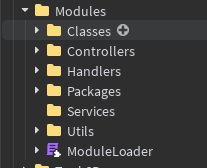
- Folder Organization: Group related modules into folders within ReplicatedStorage or ServerStorage (e.g., a 'Services' folder, a 'UIModules' folder). This hierarchical structure makes finding and managing modules much easier as your game grows.
Can Module Scripts Improve Game Performance or Scalability?
Yes, absolutely. While modules themselves are not magic performance boosters, they lay the groundwork for a more performant and scalable game. By promoting code reusability, you are less likely to have redundant code running, which can reduce processing cycles. More importantly, when you centralize logic in modules, you can apply optimizations in one place that benefit your entire game. Imagine optimizing a critical pathfinding algorithm once in a `PathfindingService` module, rather than tweaking it in a dozen different scripts. This efficiency saves you time and ensures consistent performance improvements across your project.
For scalability, modules are indispensable. As your Roblox game grows from a small passion project into a larger experience with many features, managing hundreds or thousands of lines of code becomes a nightmare without modularization. Modules allow you to break down complex systems into manageable, independent chunks. This means you can add new features or expand existing ones without a complete overhaul of your codebase, making your game much easier to scale and maintain in the long run. For developers balancing jobs and family, this means less time fixing bugs and more time creating fun experiences.
How Do Module Scripts Aid in Team Development and Collaboration?
In the world of multiplayer games and collaborative projects, Module Scripts are a game developer's best friend. For teams working on a single Roblox experience, modules streamline the workflow significantly. Imagine a scenario where multiple developers are contributing to the same game. With modules, each developer can be assigned specific systems to build: one handles the `DialogueSystem` module, another the `ShopManager`, and a third develops `PlayerStats`. These modules can be developed independently, minimizing conflicts and overwriting issues.
When each developer finishes their module, it can be easily integrated into the main game simply by placing it in a shared storage location and requiring it. This approach reduces the complexity of merging code, a common pain point in team environments. Furthermore, because modules are designed for reusability, developers can leverage each other's work without having to understand every line of code inside. They just need to know the public functions available in the returned table. This fosters efficiency and encourages a collaborative spirit, much like how social gaming trends currently emphasize shared experiences and community building.
What Are Common Pitfalls to Avoid When Using Roblox Module Scripts?
While powerful, Module Scripts can also introduce new challenges if not used carefully. Here are some common pitfalls to watch out for:
- Circular Dependencies: This happens when Module A requires Module B, and Module B in turn requires Module A. Roblox will throw an error because neither module can fully load. Structure your modules carefully to avoid this, ensuring a clear hierarchy of dependencies.
- Over-Modularization: Sometimes, creating a module for every tiny piece of logic can be overkill and make your code harder to follow than a single script. Strike a balance; modules are best for systems that are complex, reusable, or benefit from encapsulation.
- Shared State Issues: Since a module is only 'required' once and returns the same table instance to all requirers, changes made to a variable within that table by one script will be seen by all other scripts. This can lead to unexpected behavior if not managed carefully. If you need unique instances or isolated data, consider using a module as a 'class' factory that returns new objects.
- Global Scope Pollution: Avoid defining global variables (those without `local`) within your modules. This can lead to conflicts and make debugging incredibly difficult. Always use `local` for variables unless you explicitly intend to create a global.
- Incorrect Requiring: Always pass the direct Instance of the ModuleScript to `require()`, not just its name or a string path. Forgetting `game.ReplicatedStorage.MyModule` and just using `MyModule` will lead to errors.
How Can I Use Module Scripts for Common Game Systems (e.g., Inventory, UI)?
Module Scripts truly shine when building robust game systems. Let's look at a couple of common examples:
- Inventory System: You can create an `InventoryManager` module in ServerStorage. This module would handle all player inventory data, adding items, removing items, checking item counts, and saving/loading data. Server scripts would then `require(game.ServerStorage.InventoryManager)` to interact with a player's inventory, ensuring all inventory logic is centralized and consistent.
- UI Management: For complex UIs, a `UIManager` module in ReplicatedStorage is invaluable. This module could contain functions to open/close different UI elements, update text labels, handle button clicks, and manage animations. Local Scripts could then `require(game.ReplicatedStorage.UIManager)` to control the UI without having duplicate code in every single UI element's script.
- Weapon System: A `WeaponService` module could define different weapon types, their damage, fire rates, and handling logic. When a player equips a weapon, the game can retrieve its properties and functions from this module, providing a scalable way to add new weapons without overhauling existing scripts.
These examples illustrate how modules encapsulate logic, making your game easier to develop, debug, and expand.
Where Can I Find Examples or Learn More About Advanced Module Script Techniques?
The Roblox developer community is a fantastic resource for learning more. The official Roblox Developer Hub (developer.roblox.com) has comprehensive guides and API references on Module Scripts, often with examples. YouTube tutorials from experienced Roblox developers are also incredibly valuable, offering visual walkthroughs and practical demonstrations. Looking at open-source Roblox projects on GitHub or even within the Roblox Creator Marketplace can provide real-world examples of how seasoned creators implement modules for various game systems. Engaging with forums like the DevForum or community Discord servers allows you to ask questions, share your work, and learn from others' experiences. Remember, consistent learning and practice are key to mastering any development tool.
In conclusion, mastering how to use modules roblox is not just about writing more code; it is about writing smarter code. It is about taking back control of your development process, turning chaotic scripts into organized, reusable components. For those of us balancing gaming with life's demands, efficiency and clarity are paramount. By embracing Module Scripts, you are not just improving your Roblox games; you are improving your entire creative workflow, making more time for the fun and rewarding aspects of game development. What is your biggest Roblox scripting challenge? Comment below and let us help each other build amazing things!
FAQ Section
Is a Module Script a Local Script or Server Script?
A Module Script is neither a Local Script nor a Server Script. It is a distinct type of script designed to store reusable code (functions, tables, variables) that can be required by both Local Scripts (client-side) and Server Scripts (server-side). It does not run on its own.
Can I use a Module Script without returning a table?
While you can return any single value (like a string or a number) from a Module Script, it is highly recommended and standard practice to return a table. Returning a table allows you to bundle multiple functions and variables, providing a structured and extensible interface for other scripts to interact with.
What's the difference between a Module Script and a regular script?
A regular Script (or Local Script) executes its code immediately when the game starts or when it is enabled. A Module Script, however, does not run automatically; its code only executes once when it is first 'required' by another script, and it returns a value (typically a table) containing its contents for the requiring script to use.
Do Module Scripts run on the client or server?
Module Scripts technically run where they are 'required'. If a Server Script requires a module, its code runs on the server. If a Local Script requires it, its code runs on the client. The module itself is a neutral container, and its execution context depends on the script that calls it.
How often should I update my Module Scripts?
You should update your Module Scripts whenever you need to add new functionality, fix bugs, optimize existing code, or adapt to changes in your game's design. Regular updates ensure your centralized logic remains current and efficient, benefiting all scripts that rely on it.
Can I share Module Scripts with other players?
Yes, you can share Module Scripts! You can publish them as models to the Roblox Creator Marketplace, allowing other developers to use them in their own games. For team projects, simply ensuring the module is in a shared game asset allows collaborators to access and require it.
Learn to organize Roblox code efficiently using modules. Discover how modules promote code reusability and simplify complex projects. Understand the benefits of better collaboration in team development. Master the process of creating, requiring, and utilizing module scripts. Get practical tips for cleaner, more scalable Roblox game development.
35


Scripts To Use On Roblox At Isabelle Odonovan Blog . The Case To Bring Back Private Modules And How To Do So In A Safe And . An Community Tutorials Developer Forum . How To Use Module Scripts Roblox Studio YouTube . Roblox Tutorial How To Use Module Scripts YouTube


Roblox Module Scripts The Right Way YouTube . How To Use Modules Roblox Advanced Tutorial YouTube . How To Use MODULE SCRIPTS Roblox Studio YouTube . How To Use Module Scripts Roblox Studio Tutorial YouTube . Roblox Studio Writing Your Own Module Loader YouTube


Thumbnail Sleit.webp. How To Use Module Scripts Community Tutorials Developer Forum Roblox . Roblox Defusal Manual Your Guide To Not Exploding InGame . How To Use Module Scripts In Roblox Roblox How To Use Module Scripts2 362x320 . Simple Module Loader Example Community Resources Developer Forum



Subnautica 2 Metal Farm How To Unlock Build And Use It Screenshot 2026 05 18 102107 1 . What Does The Table At The Beginning Of The Module Script Do 2 690x487 . How To Use Module Scripts In Roblox Roblox How To Use Module Scripts1 . You Cannot Use Modules Directly Under Node Modules Roblox Ts Post. Roblox Module Framework Src Client At Main MonzterDev Roblox Module Roblox Module Framework


New Public Modules Cannot Be Required Across Experiences Anymore 2 1035x426 . How Do You Use Modules To Control Your Whole Game Scripting Support . How To Use Module Scripts Roblox Studios YouTube . How To Use Module Scripts In Roblox A Beginners Guide By Nithilan 1. How Do You Organize Your Modules Scripting Support Developer Forum



Why Use Module Scripts In Fps Frameworks Etc And How To Use It . Audio Occlusion Muffle Sound Module Free Easy To Use Community . How To Use Module Scripts Community Tutorials Developer Forum Roblox 2 265x500 . What Is The Issue With Spring Module Scripting Support Developer 2 1024x678 . Roblox Script How Does It Work Today



GitHub Apraxed Roblox Modules Master Custom Roblox Script Modules Roblox Modules Master. How To Use Module Scripts For EVERYTHING In Roblox Studio YouTube . Rolling Script Roblox At Catherine Fletcher Blog . Module Scripts How To Script On Roblox Episode 6 YouTube . How To Use Module Scripts In Roblox Roblox How To Use Module Scripts3 768x519