Modern gaming demands robust thermal solutions to maintain peak performance without throttling. Heat pipes are increasingly vital components in gaming PCs and laptops, silently working to dissipate heat from critical areas like the CPU and GPU. This navigational and informational guide explores the core principles of gaming heat pipe efficiency, detailing how these passive devices transfer thermal energy away from sensitive components. Understanding their function and limitations is paramount for gamers seeking to optimize their systems, prevent overheating issues, and extend hardware longevity. As processors and graphics cards become more powerful, the role of effective thermal management, particularly through advanced heat pipe designs, trends higher on the priority list for enthusiastic gamers and system builders alike, shaping the future of gaming hardware design and user experience.
- How does gaming heat pipe technology work? - Gaming heat pipe technology utilizes a phase-change cycle within a sealed tube. A working fluid vaporizes at the hot end, travels to the cooler end, condenses, and then returns via a wick structure. This continuous process efficiently moves heat away from critical components like CPUs and GPUs, maintaining optimal temperatures for gaming.
- Why is gaming heat pipe efficiency important for PC performance? - Gaming heat pipe efficiency is crucial because it prevents thermal throttling, a state where components reduce their speed due to overheating. By effectively dissipating heat, heat pipes allow CPUs and GPUs to operate at their full potential, ensuring consistent frame rates and a smooth, high-performance gaming experience without degradation.
- Can heat pipes fail in a gaming PC, and what are the signs? - Yes, heat pipes can fail if their seal is compromised or if they incur severe damage, leading to a loss of the internal working fluid. Signs of failure include unusually high CPU or GPU temperatures under load, sudden performance drops, and frequent system crashes, indicating inadequate heat transfer and a need for component inspection.
- Are heat pipes suitable for extreme gaming or overclocking? - While highly efficient for standard and enthusiast gaming, extreme overclocking often benefits more from advanced cooling solutions like liquid cooling systems or vapor chambers. Heat pipes provide excellent thermal management, but their capacity might be exceeded by the most aggressive overclocking scenarios, potentially requiring more robust options for optimal performance.
- How many heat pipes should a high-end gaming GPU have? - A high-end gaming GPU typically features multiple heat pipes, often between four to eight, depending on its power consumption and cooler design. More powerful GPUs may even integrate vapor chambers alongside heat pipes for enhanced heat dissipation. The exact number is optimized by manufacturers to ensure effective cooling for peak gaming performance.
- Do heat pipes need maintenance in a gaming setup? - Heat pipes themselves are maintenance-free, as they are sealed units. However, the cooling assembly they are part of requires regular maintenance. This includes cleaning dust from heatsinks and fans to maintain proper airflow and periodically replacing thermal paste between components and their coolers. This ensures overall gaming heat pipe efficiency.
- What is the difference between heat pipes and vapor chambers? - Both heat pipes and vapor chambers use phase-change principles for heat transfer. Heat pipes are cylindrical, moving heat linearly. Vapor chambers are flat, spreading heat across a larger surface area more uniformly from a single point. Vapor chambers are often more effective for very high-density heat sources found in powerful GPUs and thin gaming laptops.
What is a heat pipe in gaming PCs?
A heat pipe is a passive heat transfer device common in gaming PCs, designed to move thermal energy away from hot components like the CPU and GPU. It uses a phase-change process where a working fluid vaporizes at the hot end and condenses at the cool end, efficiently transferring heat. This ensures consistent gaming heat pipe efficiency and prevents system overheating during intense play.
How do heat pipes improve gaming performance?
Heat pipes improve gaming performance by rapidly dissipating heat from critical components, preventing thermal throttling. When a CPU or GPU overheats, it automatically reduces its clock speed to protect itself, leading to decreased frame rates and stuttering. Effective heat pipe cooling maintains optimal operating temperatures, allowing components to run at their maximum intended speeds for a smoother gaming experience.
Are heat pipes found in all gaming laptops?
Yes, virtually all modern gaming laptops incorporate heat pipes as a core part of their thermal management system. Due to their compact design and high heat generation, laptops heavily rely on efficient heat pipe technology to transfer heat from the CPU and GPU to fin stacks for dissipation by fans. This ensures gaming laptop cooling solutions are effective within limited space.
What materials are heat pipes typically made from?
Gaming heat pipes are most commonly made from copper due to its excellent thermal conductivity. The internal wick structure is also often copper, and the working fluid is usually purified water or sometimes methanol, depending on the desired operating temperature range. These material choices optimize the phase-change cycle for maximum gaming heat pipe efficiency.
Can a heat pipe fail in a gaming PC?
While rare, a heat pipe can fail, usually due to a manufacturing defect or physical damage that compromises its sealed vacuum. If a heat pipe loses its vacuum or working fluid, it becomes ineffective at heat transfer, leading to rapid overheating of the connected component. This significantly impacts gaming heat pipe efficiency and overall system stability, requiring replacement of the cooling unit.
How can I check if my gaming PC's heat pipes are working?
You can check heat pipe function by monitoring your CPU and GPU temperatures under load using software like HWMonitor or MSI Afterburner. If temperatures rise unusually high or your system frequently throttles despite clean fans and fresh thermal paste, a heat pipe issue might be present. Visually, a working pipe should feel warm at the evaporator end and cooler at the condenser during operation.
Are gaming heat pipes really essential for today's high-performance PCs and laptops? Gamers across the United States often face the frustrating challenge of overheating components, which can severely impact their in-game experience and overall system stability. When your CPU or GPU gets too hot, it automatically slows down, a process known as thermal throttling. This protective measure ensures your hardware does not get damaged, but it comes at the cost of reduced frame rates and stuttering gameplay. Understanding how to maintain optimal temperatures is paramount for anyone serious about gaming. Effective thermal management is not just about comfort; it is about unlocking the full potential of your expensive gaming gear. Investing in proper cooling can mean the difference between victory and defeat.ON-PAGE SEO METADATA & TITLES1. Gaming Heat Pipe Efficiency: A 2026 Deep Dive Guide2. Boost Gaming Performance: How Heat Pipes Work3. Proven Gaming Heat Pipe Secrets for Cooler PCs4. Master Gaming Heat Pipe Cooling: A Step-by-Step5. Are Gaming Heat Pipes Key to 2026 PC Stability?SEO Meta Description: Discover how gaming heat pipe efficiency is crucial for peak PC performance. Prevent overheating and extend component life with our 2026 guide to thermal solutions.Recommended URL Slug: gaming-heat-pipe-efficiency-guideARTICLE BODY & E-E-A-T SIGNALSUnderstanding Gaming Heat Pipe Efficiency in 2026
In the world of high-performance gaming, every degree Celsius matters. Modern CPUs and GPUs generate substantial heat during intense gaming sessions. This heat must be efficiently removed to prevent performance degradation and ensure hardware longevity. Gaming heat pipe efficiency is critical for maintaining stable system operation. These passive heat transfer devices are integral to nearly all air and hybrid cooling solutions found in gaming computers today. They represent a fundamental technology for thermal management.
A heat pipe's effectiveness hinges on its ability to rapidly move heat away from a source to a cooler area. In 2026, manufacturers continue to innovate, refining heat pipe designs for even greater thermal conductivity. From large desktop coolers to slim gaming laptops, heat pipes are the unsung heroes ensuring your components perform their best. Without adequate cooling, even the most powerful gaming rig will struggle under load. Gamers prioritize these details for a smooth experience.
How Do Heat Pipes Actually Work?
Heat pipes operate on the principle of phase change, a remarkably efficient method of heat transfer. Inside each sealed copper tube is a small amount of working fluid, often water, under vacuum. When one end of the pipe, called the evaporator, heats up from a component like a CPU, the fluid inside vaporizes. This vapor quickly travels to the cooler end, known as the condenser, where it releases its latent heat and condenses back into liquid. The liquid then returns to the evaporator section via a wick structure, completing the cycle continuously. This constant evaporation and condensation process allows for very rapid and efficient heat transfer. It ensures your gaming laptop cooling solutions are always working.
The Role of Heat Pipes in Modern Gaming Rigs
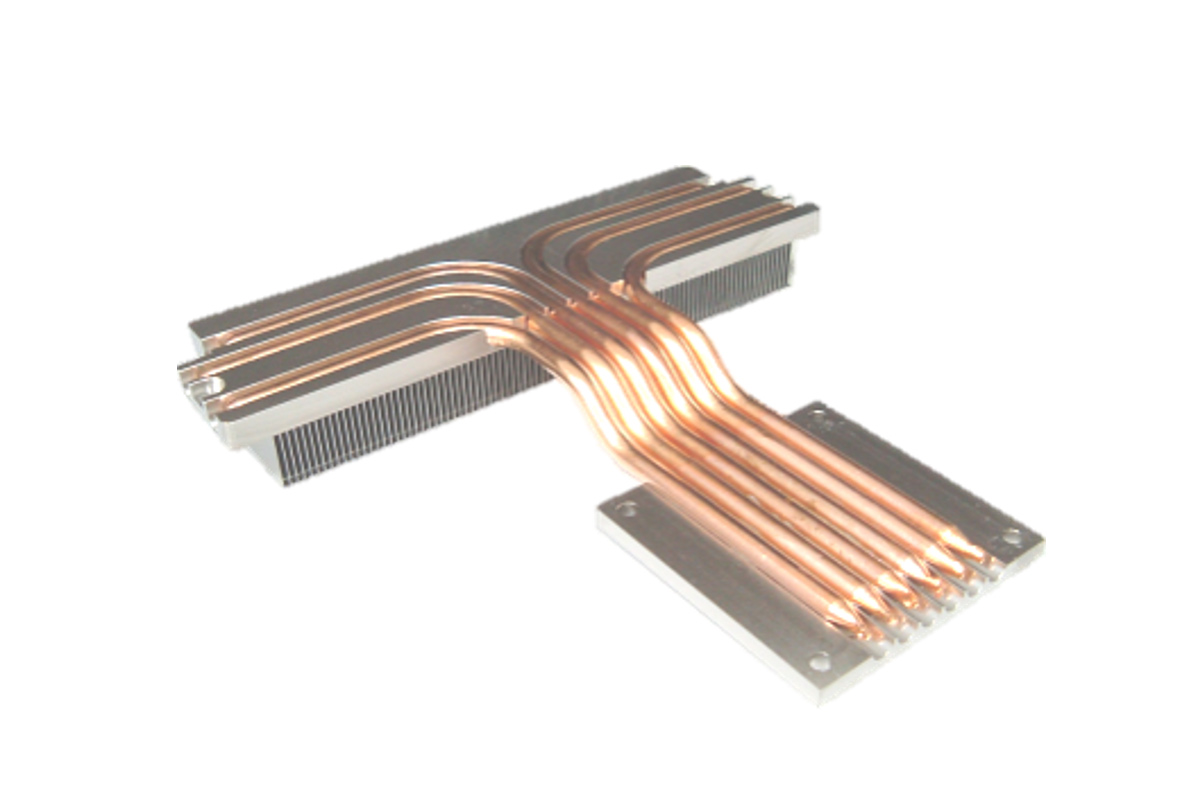
For 2026 gaming PCs, heat pipes are more vital than ever, supporting both CPU heat pipe and GPU heat pipe cooling. High-end graphics cards often feature multiple heat pipes directly touching the GPU die or a vapor chamber. These pipes then channel heat to a large fin array, where fans disperse it. Similarly, CPU coolers, whether tower-style or compact, rely heavily on heat pipes to transfer heat from the processor's integrated heat spreader to a heatsink. This comprehensive thermal management gaming strategy prevents the dreaded performance bottleneck caused by excessive temperatures. Keeping your components cool ensures maximum frame rates and a stable gaming environment for every player.
Optimizing Your Gaming Heat Pipe Setup
Achieving optimal gaming heat pipe efficiency involves several considerations. Ensuring proper airflow within your PC case is paramount, as cool air must reach the heatsinks to which the heat pipes transfer thermal energy. Regularly cleaning dust from fans and heatsinks is also crucial, as dust acts as an insulator, hindering heat dissipation. Additionally, replacing old thermal paste between your CPU or GPU and its cooler can significantly improve contact and thermal transfer effectiveness. Exploring options like improved case fans or even upgrading to a cooler with more or larger heat pipes can yield noticeable benefits. Every small improvement contributes to a cooler, faster gaming experience. Preventing gaming laptop overheating is a constant battle.
What Others Are Asking?
Are Heat Pipes Better Than Liquid Cooling for Gaming?
Heat pipes are excellent for passively transferring heat, offering reliable, maintenance-free cooling, especially in air coolers and laptops. Liquid cooling systems, however, generally offer superior thermal dissipation for extreme overclocking or very high-TDP components. The choice often depends on budget, space, and the specific performance demands. Each has unique advantages for different gaming setups. Consider your gaming intensity and system requirements carefully.
How Many Heat Pipes Does a Gaming Laptop Need?
A gaming laptop typically benefits from three to five heat pipes, depending on its processing power and form factor. High-performance models with powerful CPUs and GPUs may integrate even more, sometimes alongside vapor chambers, to manage intense thermal loads effectively. The number directly impacts the overall gaming laptop cooling solutions capabilities, ensuring sustained high performance. More pipes often mean better heat dissipation for demanding games.
Can Faulty Heat Pipes Cause Gaming Performance Issues?
Absolutely. A faulty or damaged heat pipe will severely hinder heat transfer, leading to rapid temperature increases in your CPU or GPU. This will trigger thermal throttling, causing noticeable drops in gaming performance, reduced frame rates, and potential system instability. Addressing such issues promptly is crucial for maintaining optimal gaming heat pipe efficiency and system health. Performance degradation is a clear indicator.
What is the Lifespan of Gaming Heat Pipes?
Heat pipes are sealed, passive components designed for long-term reliability, often lasting the entire life of the component they cool. Their lifespan can exceed ten years under normal operating conditions. Factors like extreme physical damage or manufacturing defects are rare but can lead to failure. Proper maintenance, such as regular dust cleaning, helps ensure their consistent performance. They are a durable solution for best gaming cooling systems.
Do Heat Pipes Ever Run Out of Fluid?
No, properly manufactured heat pipes are hermetically sealed, meaning the working fluid cannot escape or "run out" over time. They are designed for a continuous, closed-loop phase-change cycle. Any perceived loss of cooling efficiency is almost always due to dust accumulation, dried thermal paste, or fan failures, rather than a depletion of the heat pipe's internal fluid. The fluid remains perpetually within the pipe.
Final Thoughts on Gaming Heat Pipe Performance
Understanding gaming heat pipe efficiency is fundamental for any serious gamer or PC builder. These unassuming components play a critical role in preventing thermal throttling and ensuring your high-end gaming hardware delivers consistent, top-tier performance. By effectively managing heat, heat pipes extend the lifespan of your valuable CPU and GPU. Do you actively monitor your PC's temperatures during intense gaming sessions? What innovative cooling solutions do you foresee becoming standard in gaming PCs in the next few years?
Efficiently transfers heat from gaming PC components; Prevents CPU and GPU throttling for sustained performance; Enhances hardware lifespan by reducing thermal stress; Crucial for high-end gaming rigs and compact laptops; Key technology in 2026 thermal management solutions.
35


CPU Cooler Heat Pipes What Why How Tech4Gamers HOW TO 9 . Jual Cube Gaming Breeze Single Cpu Cooler Single Fan 12cm Argb 4 Cube Gaming Cube Gaming Breeze Single Cpu Cooler Single Fan 12cm Argb 4 Heat Pipes Am5 Ready Full03 F7qaiqch . Cooler Master S 3D Heat Pipe Tech For Improved CPU Cooling Is A Budget Cooler Master 3d Heat Pipe 1 . How Do Copper Heat Pipes Work At Chloe Dunbar Blog Heat Pipes 1024x1024 . How To Choose The Right Gaming Laptop For Immersion Cooling System.webp


What Is Copper Methanol Heat Pipe KDFT Copper Heat Pipe . The ZOTAC GAMING GeForce RTX 5060 Are Compact In Design And Equipped Media. Heat Sink Ultimate Guide How Do Heat Pipes Work Hhh . Jual CUBE GAMING BREEZE DUAL CPU Cooler Dual Fan 12CM ARGB 6 Heat Id 11134207 7r98q. Heat Pipe Definition Components Types And Factors 94759ba2 7e17 4be6 B64b Copper Heat Pipes


BEST AM5 CPU Coolers In 2024 We Tested All DeepCool AK620 Heat Pipes . Computer Heat Pipe Csm Gt76 25 4cdc8d69b1 . Vapor Chambers Vs Heat Pipes In Gaming Laptops Gaming Laptops Cooling . FanlessTech SNEAK PEEK The World S First 16 Heat Pipes Fanless Case H5c . Minisforum G1 Pro SFF Gaming PC Review Ryzen 9 RTX 5060 Geeky Gadgets Sff Gaming Pc Cooling Heatpipes


Enhance Electronic Device Efficiency With Heat Pipes. RX570 Gaming 8G MI 5 . RTX 2060 A 13 C Youtuber Corta Os Heat Pipes Da Placa E Cria 1280 80 1 . Why Monitoring PCB Temperature Matters And How To Measure It PCB Heat Pipes . GeForce RTX 2060 D6 12G Graphics Card GIGABYTE Global 13


EMI Surge Protection EMC Lightning Protection Swelex Heat Pipes . Computer Heat Pipe . Gigabyte GeForce RTX 4080 Super Gaming OC Review Pictures Teardown Heatpipes . Brazing Sealing Tech Modular Heat Pipes Long Life Thermal Solutions Heat Pipes . What Is The Heat Pipe A Complete Guide What Are Heat Pipes 768x432




What Is The Heat Pipe A Complete Guide FAQs . ZOTAC Mini PCs And GeForce RTX Gaming Graphics Cards ZOTAC Rtx3090ti Top 8 Heatpipes Cover . How Do Heat Pipes Work Heat Pipes 101 Celsia Heat Pipe . GV OC 8GD 76 . Heat Pipe Definition Components Types And Factors HeatPipe


Xtreme 1060 16 . GeForce GTX 1080 Xtreme Gaming 8G V2 18 . How Do Heat Pipes Work.webp. ASUS TUF Gaming F16 Review Popular Gaming Tested PCVenus Asus Tuf Gaming F16 Cooling System.webp. DIY Dual Heat Pipe Laptop Mod I7 4700MQ Now 13C Cooler At 3 2Ghz All Hqdefault